

Webhooks
The PhishSpot REST API (Chapter 27) lets you pull data on demand. Webhooks flip the direction: instead of you polling us, we POST to your URL the moment something happens. Wire a webhook into your SIEM and an opened campaign event becomes a security alert seconds after the user clicks. Wire one into your LMS and a finished course updates the learner record without you running a nightly sync.
This chapter covers what events are available, how to register an endpoint, what arrives on the wire, and how retries and signing work.
26.1 Why webhooks vs polling
Section titled “26.1 Why webhooks vs polling”Polling means asking “anything new?” on a timer and ignoring the answer most of the time. It wastes API calls, has built-in latency (you find out about events on your next poll, not when they happen), and gets clunky at scale (longer polls miss events, shorter polls hammer the API).
Webhooks invert it. You register a URL once; we deliver each event there exactly when it occurs. Same data, lower latency, fewer requests. The downside: you need a reachable HTTPS endpoint to receive deliveries — but for an integration target (SIEM, SOAR, LMS, chat bot, internal tool) that’s usually trivial.
26.2 Creating an endpoint
Section titled “26.2 Creating an endpoint”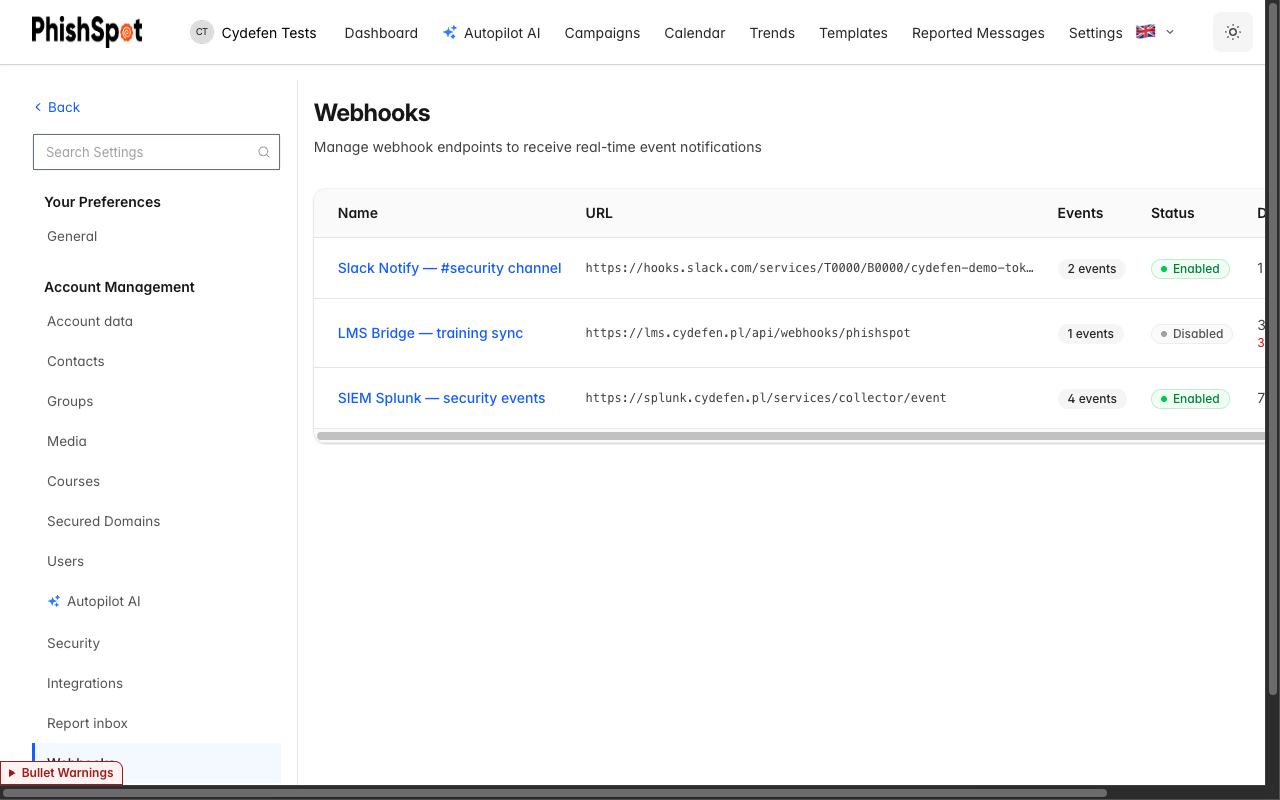
- Open Account settings → Webhooks. The endpoints page lists existing webhooks with columns for Name, URL, Events (count of subscribed types), Status (Enabled / Disabled), Deliveries (total + failed count), and Actions.
- Click New webhook. The form has four fields:
- Name — a friendly label. Examples from a working setup: “SIEM Splunk — security events”, “LMS Bridge — training sync”, “Slack Notify — #security channel”.
- Webhook URL — where deliveries POST. Must be HTTPS. The platform rejects URLs that resolve to localhost, link-local addresses (169.254/16), or any RFC1918 private range (10/8, 172.16/12, 192.168/16). It also blocks
*.phishspot.com. The goal is to keep the webhook system from being used as an internal-network probe. - Subscribe to Events — checkboxes for each event type (see §26.3). Pick at least one.
- Enable webhook endpoint — toggle. Off means we keep the record but don’t deliver anything.
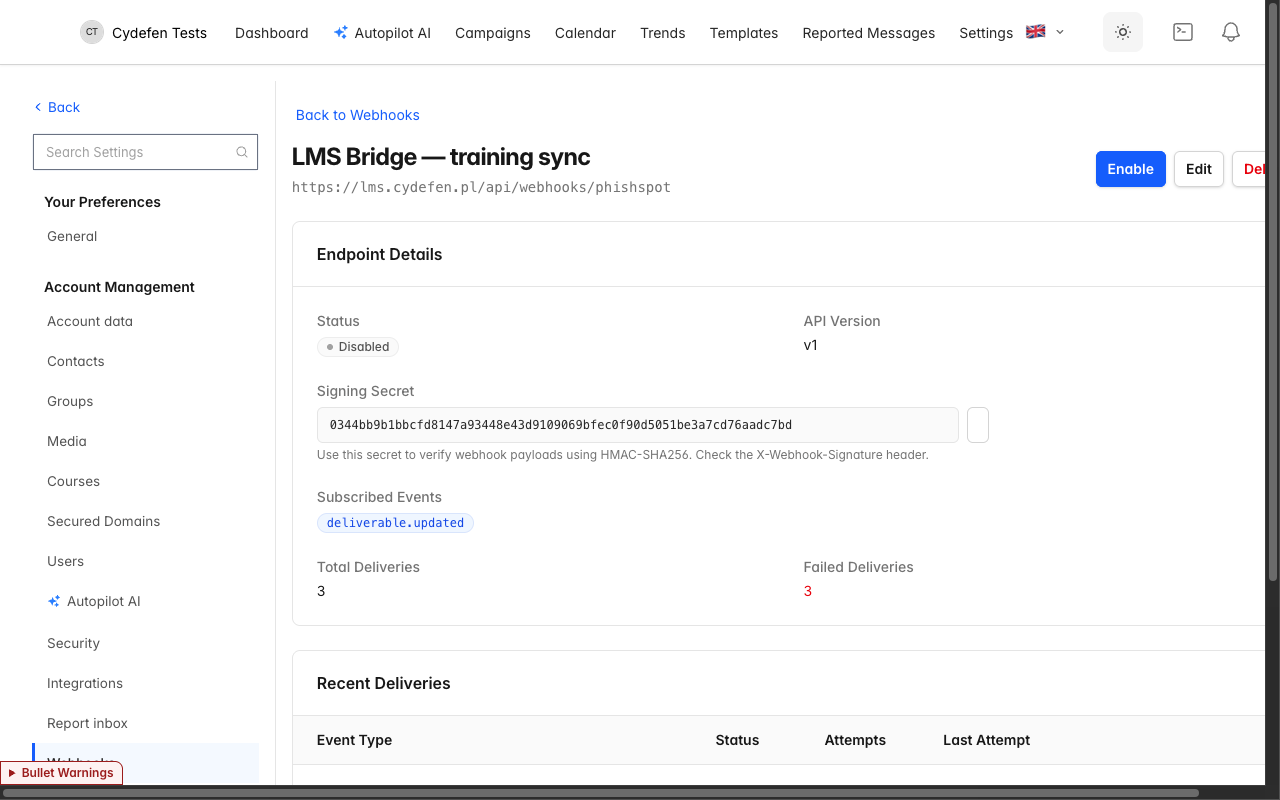
- Save. PhishSpot generates a signing secret (64-char hex from
SecureRandom.hex(32)) and displays it in full on the endpoint detail page with a copy-to-clipboard button. Store it somewhere safe; we never re-display it elsewhere.
The endpoint is live immediately. Any event you subscribed to that fires from now on will be POSTed to your URL.
26.3 Available event types
Section titled “26.3 Available event types”Nine event types are available today, grouped by subject:
| Event type | When it fires |
|---|---|
campaign.created | A new campaign is created (manual or from an autopilot iteration). |
campaign.updated | A campaign’s state, recipients or content changes. |
campaign.deleted | A campaign is deleted. |
contact.created | A contact is added (CSV, manual, or directory sync). |
contact.updated | A contact’s email, department, title, group membership or external state changes. |
contact.deleted | A contact is removed from the account. |
deliverable.created | A campaign send produces a deliverable row (one per recipient). |
deliverable.updated | A recipient’s state changes (sent → opened → clicked → submitted → educated, or bounced). |
spam_whitelist.updated | The sending-IP / sending-domain list for the account changes — see Chapter 22 §22.5. |
An endpoint can subscribe to any combination. A typical SIEM subscribes to contact.* and deliverable.* so it sees both who’s targeted and how they react. A typical LMS bridge subscribes only to deliverable.updated because it only cares when someone progresses through a training assignment.
26.4 The delivery: payload + signature
Section titled “26.4 The delivery: payload + signature”Each delivery is an HTTP POST with a JSON body. The body is the event — the same record you can fetch via the API. Shape:
{ "id": "550e8400-e29b-41d4-a716-446655440000", "type": "contact.created", "created_at": "2026-05-20T14:22:33.000Z", "api_version": 1, "data": { "id": 42, "email": "anna.kowalska@cydefen.pl" }}id— UUID identifying this event; idempotency key. Replays of the same event use the sameid.type— the event type name (one of the nine in §26.3).created_at— ISO-8601 UTC timestamp of when the event occurred.api_version— the integer schema version.1for the format above. Future-breaking shape changes will bump this and we’ll notify you in advance.data— subject-specific fields. For nowdataincludes the subject’sidand key identifying attributes; expand the payload by fetching the full record via the REST API using the includedid.
Signing. Every POST carries an X-Webhook-Signature header containing the HMAC-SHA256 of the JSON body, computed with the endpoint’s signing secret. Verification on your side:
expected = OpenSSL::HMAC.hexdigest("SHA256", signing_secret, request.raw_post)signature = request.headers["X-Webhook-Signature"]ActiveSupport::SecurityUtils.secure_compare(expected, signature) or render status: 401import hmac, hashlibexpected = hmac.new(secret.encode(), request.body, hashlib.sha256).hexdigest()if not hmac.compare_digest(expected, request.headers["X-Webhook-Signature"]): abort(401)Use the secret-protected POSTs only — never trust an unsigned request claiming to be from PhishSpot.
26.5 Retries
Section titled “26.5 Retries”If your endpoint responds with anything other than HTTP 2xx, the delivery is queued for retry. Retries follow a fixed schedule:
| Attempt | Delay from previous |
|---|---|
| 1 | (immediate) |
| 2 | +15 seconds |
| 3 | +1 minute |
| 4 | +5 minutes |
| 5 | +15 minutes |
| 6 | +1 hour |
After 5 retries (6 total attempts) the delivery is marked Failed and not retried again. The endpoint’s consecutive_failures counter increments on each fully-failed delivery. After it crosses 5 consecutive failures the account admins are emailed once (with a 7-day cooldown to avoid spamming when an endpoint is misconfigured long-term). The endpoint itself stays enabled — we don’t auto-disable it, because most outages are transient and self-resolving deliveries should be allowed to succeed.
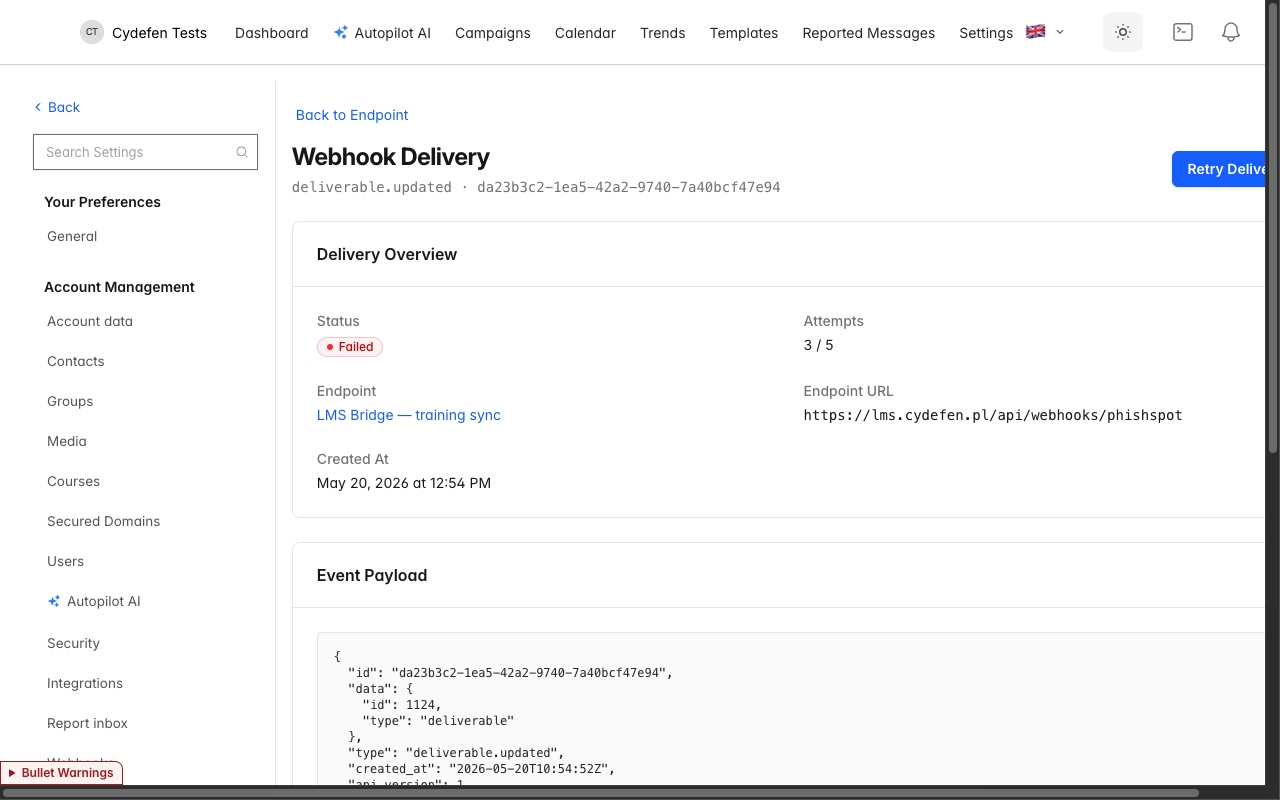
If you want to retry a single failed delivery manually after fixing your side, open the delivery detail page (§26.6) and click Retry. That creates a fresh delivery for the same event, with attempt counters reset.
26.6 Delivery history
Section titled “26.6 Delivery history”The endpoint detail page (click any endpoint name in the index) shows everything we know about that endpoint:
- Endpoint Details — name, URL, API version, signing secret (with copy button), subscribed events.
- Status — Enabled / Disabled toggle.
- Recent Deliveries — table of the last 50 deliveries with columns:
- Event Type (e.g.,
contact.created) - Status — Pending / Delivering / Delivered / Failed
- Attempts — current attempt count / max (e.g.,
1 / 5,5 / 5) - Last Attempt — timestamp
- Actions — View Details, Retry Delivery
- Event Type (e.g.,
Click View Details on any delivery row to open the delivery detail page. It shows the full payload (pretty-printed JSON), the destination URL we POSTed to, and a per-attempt log: attempt number, HTTP status code, response duration in ms, and response body (or the error message if the request didn’t complete). This is your primary debug surface when an integration breaks.
26.7 Operational guidance
Section titled “26.7 Operational guidance”- Acknowledge fast. Your handler should accept the delivery (return 2xx) and process asynchronously. We give up on slow responders — and slow responders cascade into retries, which cascade into “consecutive failures” emails.
- Handle duplicates. Network issues can cause the same event to arrive twice. Dedupe on the
idfield — it’s stable across retries. - Validate the signature. Don’t act on a webhook whose signature doesn’t match. The secret-protected POST is the only authentication; without it the integration is replayable by anyone who guesses the URL.
- Expect bursts. A campaign with 1,000 recipients produces 1,000
deliverable.createdevents in a short window. Make sure your handler scales. - Rotate the secret if it leaks. Delete and recreate the endpoint — there’s no in-place rotation in the UI today.
26.8 Cross-references
Section titled “26.8 Cross-references”- The REST API for pulling the same data on demand: Chapter 27 REST API Reference.
- The auto-whitelist refresh integration that uses the same delivery pipeline: Chapter 22 Spam Filter Whitelist.
- The Contacts the
contact.*events refer to: Chapter 5 Contacts. - The Campaigns the
campaign.*events refer to: Chapter 4 Campaigns. - Directory sync events that produce most
contact.*traffic in production: Chapter 25 Directory Sync.